Frequently Asked Questions
We have listed answers to the most common questions surrounding our service. If you cannot find yours, please leave us a message through our contact form.Accordingly, we are not permitted to provide you with tax advice. We merely provide software that simplifies and speeds up the preparation of your travel expense report.
We continuously adapt our software to the current legal landscape and offer you, our customer, the option to choose between different calculation methods yourself.
We are happy to answer general questions about the software’s functionality and calculation methods, and we are, of course, happy to assist with any questions regarding understanding the software or technical issues. However, we are not permitted to provide recommendations tailored to your individual situation.
Furthermore, we must point out that all calculations are based on the records of your work (duty schedules, time sheets, logbooks, etc.) as you submit them to us. Unfortunately, not every file format is ideal, as they sometimes omit individual events or contain formatting discrepancies. Both of these issues can cause the calculation to deviate from reality due to an inaccurate data set. You can find further information on this in the overview of supported file formats.
Therefore, it is important that you closely monitor the creation process and also check the result for plausibility.
Ultimately, however, the same rule always applies: Please do not hesitate to contact us if you get stuck.
One reason for many failed uploads is the use of a pdf printer: Software like Netline, AIMS or CAS usually provide a perfectly readable file. Yet, when a pdf printer is used to save the result, the resulting file proves unusable. Instead, try a native export function or a direct download.
For a detailed compatibility list, click here.
You can always add, edit or delete your duties using our editor.
Go to the duty editor (Login required)
If you want to add or change events of an evaluation you need to edit the evaluation itself!
Show my evaluations (Login required)Unfortunately, when you work with Lufthansa or Condor this row is empty. You may calculate this amount using the Streckeneinsatzabrechnung. In this case you can also use our automatic extraction function, by jointly uploading all files of one year.
Manage reimbursements (Login required)
Saving your calendar link (Login required)
Download tutorial for MyTime calendar link (pdf)
When you provide a valid link, our system will regularly retrieve events from your calendar at the beginning of each month. This means, that this option is not suitable for an immediate evaluation, but can lay the foundation for future evaluations.
The MyTime calendar only provides duties of the previous and the current month.
Crew Portal import (Login required)
The Crew Portal only reliably provides duties of the previous three months and the current month.
A - Einkommenssteuergesetz §9 - Werbungskosten (external)
B - Lohnsteuerhandbuch (external)
C - Lohnsteuerhandbuch - Anhang 25 - I (external)
D - Lohnsteuerhandbuch - Anhang 25 - III (external)
legal references can be found in a separate help article
The amount of the additional meal allowance (VMA) for business-related travel within Germany is determined by Section 9 of the Income Tax Act (Ref. A). Furthermore, the Federal Ministry of Finance (BMF) publishes an annual “Overview of the Applicable Flat Rates for Additional Meal Allowances Abroad” (Ref. C). This overview contains a list of countries and regions, each with a VMA amount for a full-day absence (24 hours) and an absence of at least 8 hours, which also applies to so-called arrival and departure days. The current version of this document is updated and published annually as part of the Payroll Tax Handbook (Ref. B). Furthermore, this letter contains instructions on which lump-sum amount applies when traveling to multiple countries or regions, thereby supplementing the 2020 guidance on the “Tax Treatment of Employees’ Travel Expenses” (Ref D).
avTax adopts the flat rates unchanged from the Income Tax Act (EStG - Ref A) and the letter from the Federal Ministry of Finance (BMF - Ref C). The applicable VMA amount for the day of departure is determined by the location reached before midnight local time (Ref C). If a change of location occurs after midnight, the last VMA value is used—either the starting point of the trip spanning two days or the value of a previous foreign location, provided it was reached on the same day (Ref C). For full-day absences, the location reached by midnight local time is relevant (Ref C). On departure days, the VMA value of the last location visited is used (Ref. C, D). If this location is within the country of residence, the last foreign location is used, provided it was reached on the same day (Ref. E). For one-day trips involving more than 8 hours of absence from the primary place of work, the VMA of the last place of work is used (Ref D). If this is located within the country of residence, the last foreign place of work is used (Ref E). In the case of an absence of more than 8 hours overnight without an overnight stay, only the VMA value for the first day is used (Ref D).
Primary Place of Work and Additional Places of Work
VMA is calculated when you are assigned to work outside your residence and your primary place of work (work away from home) (Ref A). This calculation corresponds to the option offblock/onblock in our calculation preferences. If you would like to have VMA amounts calculated starting from the moment you leave your home (e.g., if you do not have a primary place of work), avTax offers this option when you use the leaving/returning home setting.
If you only occasionally travel to another place of work directly from your home without passing through your primary place of work, you can create trips to additional places of work (wTS trips) after purchasing the evaluation. This option ensures that the VMA for this trip is calculated starting from your front door.
Employer-Provided Meals
If your employer provides meals during your absence, the additional meal allowance (VMA) must be reduced as follows (Ref A):
- Breakfast 20%
- Lunch 40%
- Dinner 40%
You can configure this setting in your travel profiles. The options for breakfast and dinner automatically reduce the VMA as soon as a hotel stay is detected on a given day. The lunch option reduces the VMA if a flight took place on a given day.
Before Purchasing
Our script automatically generates journeys from your home to your workplace. Up until the preview (the last step before purchase), these journeys are simulated in the background based on the information in your travel profiles so that we can present you with a preliminary result.
Journey Types
Based on the combination of your shifts and your travel profiles, avTax automatically generates the following different journey types:
- From home to home base (or vice versa) — as soon as a rest period at the home base is detected (and, if applicable, the condition for using duty lodging is met)
- Trips between duty lodging and the homebase/place of residence — if you select the duty lodging”option in your travel profile
- Trips to other work locations — This type is automatically generated only in specific cases and under very limited conditions, e.g., when ground duty at a non-home base is detected and there is sufficient rest time before or after
The journey types listed above can also be created, modified, or deleted manually after purchase. Additionally, you have the option to create the type other journey.
After Purchase
When you purchase an evaluation, the automatically simulated journeys are saved, and you can edit, delete, or add journeys in the editor.
Departure from your place of residence marks the start of a rotation, and return to your place of residence marks the end of that rotation. However, the VMA calculation is based on the corresponding settings in the calculation preferences. See VMA Calculation
legal references can be found in a separate help article
Lump sum or actual costs
You can choose how avTax calculates your journey expenses in your calculation preferences. You can either claim actual journey costs by specifying an amount in cents per kilometer driven. Alternatively, you can choose the mileage lump sum according the following rates (Ref A):
- Through 2020: 30ct/km
- For 2021: 30ct/km for the first 20 kilometers, and 35ct/km thereafter
- since 2022: 30ct/km for the first 20 kilometers, and 38ct/km thereafter
The option to cap travel expenses at €4,500 if you do not use your own or a company-provided vehicle (Ref A) can be found in the calculation preferences.
One-way distance or round trip
In accordance with the Income Tax Act (Ref A), when you select the One-way distance option, avTax calculates the lump sum rates specified above only for trips toward the home base (residence to homebase, residence to duty lodging, duty lodging to homebase). Return trips are set at €0. If you would like the lump sum to be calculated for return trips as well, you can select the option round trip.
For journeys to additional work places (aWP journeys), regardless of these settings, 30ct/km is applied to the entire distance, including the return trip (Ref B).
Please note: if you intend to have your journeys recalculated according to your travel profiles, first you need to change the travel profiles and then you can click "Reset Journeys" in your evaluation. This option erases all manual changes.
Or you can list those journeys in general after your purchase. This is a separate option which is only shown then.
The PDF contains a summary of all relevant values and instructions where to enter those values in the appendix N of your tax declaration. Furthermore, you\'ll receive a detailed listing of rotations and journeys with costs for laundry, tips and meal allowances. You can attach this PDF when you submit your tax declaration.
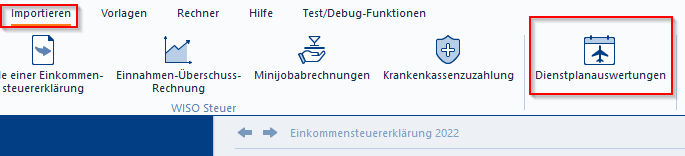
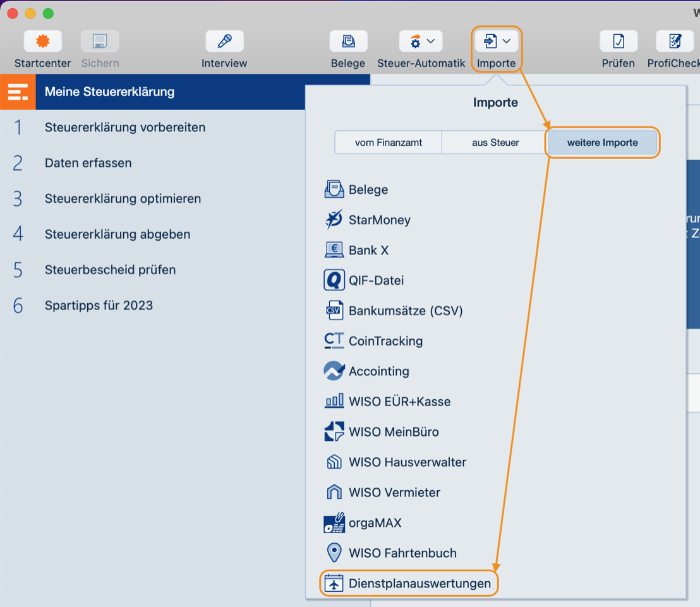
Alternatively, you can use the XML file to import your data into WISO Steuer.
When you are using the PC version click on Importieren Dienstplanauswertung.
In the Mac version please navigate to Importe weitere Importe Dienstplanauswertungen.
In case you don\'t want to use the automatic import, you can use the instructions enclosed in your PDF which lists the rows of the appendix N where you need to enter the appropriate values.
Appendix N is referenced throughout the WISO dialogue multiple times. Buhl also offers additional information through the following link:
WISO - Anlage N (German language only)
In case of uncertainties during the dialogue mode, you can always choose the form mode. Detailed instructions how to get there can be found here:
WISO - Formulareingabe (German language only)
For simplification purposes, Buhl recommends to list the total additional meal allowances (Verpflegungsmehraufwand/VMA) as "sonstige Werbungskosten" with the remark "Reisekosten laut Aufstellung". When submitting your tax declaration, please attach the PDF in this case.
This is the context support.